Python in Maya - intro, history
At first there was/is Maya Python (maya.cmds), from Autodesk. MEL calls were wrapped in Python, that's about it.
At Luma Pictures, developers began 'PyMEL' (pymel), and started a Google forum to spread the word (and did!!). pymel wraps around maya.cmds :)
Today we have PyMEL officially being bundled by Autodesk.. So there are two ways to "do Python in Maya".
Be sure to do the PyMEL samples below, in Maya 2011 or later.
What's in maya.cmds, pymel
import maya.cmds
import maya.mel
dir(maya.cmds)
dir(maya.mel)


from pymel.core import *
dir()
maya.cmds is strings-based, pymel is object-based
for n in maya.cmds.ls():
  print type(n)
# oh no!!! maya.cmds is simply MEL in Python's clothing :(

for n in ls():
  print type(n)
# THIS is why PyMEL is WAAAAAAAAAAAAAAAAAAY BETTER!!!!!!!!!
Trying out maya.cmds
The idea is pretty simple - commands you need to run are all 'maya.cmds.something()', with extra inputs being specified inside the '()' (or 'cmds.something()' if you use the import shortcut below).
import maya.cmds as cmds
cmds.plane()

cmds.sphere(radius=4)
cmds.move(2.0, 1.0, 1.0, 'nurbsSphere1')

cmds.sphere(n='ball')

cmds.ls(type='nurbsSurface')

cmds.ls(selection=True)

cmds.getAttr('ball.translate')
cmds.getAttr('ball.translateX')
cmds.setAttr('ball.translateX', -5.0)

# something more fancy
import math
for i in range(360):
 x = math.cos(i*3.1415/180)
 y = math.sin(i*3.1415/180)
 cmds.sphere(r=0.01,p=[x,y,0])
UI creation
MEL remains a powerful, simple way (although verbose) to create UI in Maya. So we can use maya.cmds (or pymel) to create them in Python (since they call MEL anyway). FYI - a completely different, and new, way is to code your UI in PyQt (or 'QtPy') - Qt is a very popular toolkit (originally from Trolltech in Norway, since acquired by Nokia) that is used in cellphones/PDAs as well as desktops.
Here are some UI examples.
cmds.promptDialog(button=['OK'])
userText = cmds.promptDialog(query=True, text=True)
print "You entered " + userText + " in the dialog box :)"

cmds.promptDialog(
        title='Create object',
        message='Enter Object Name:',
        button=['Sphere', 'Cancel'],
        defaultButton='Sphere',
        cancelButton='Cancel')

text = cmds.promptDialog(query=True, text=True)
cmds.polySphere(n=text)

cmds.promptDialog(
        title='Sphere creation',
        message='Enter sphere\'s name:',
        button=['Do it', 'Cancel'],
        defaultButton='Create sphere',
        cancelButton='Cancel')

sphNm = cmds.promptDialog(query=True, text=True)
cmds.polySphere(n=sphNm)
As you can see, the commands are not bad (not complex). Here is another piece of code that shows how to create radio-buttons. This is a screenshot.
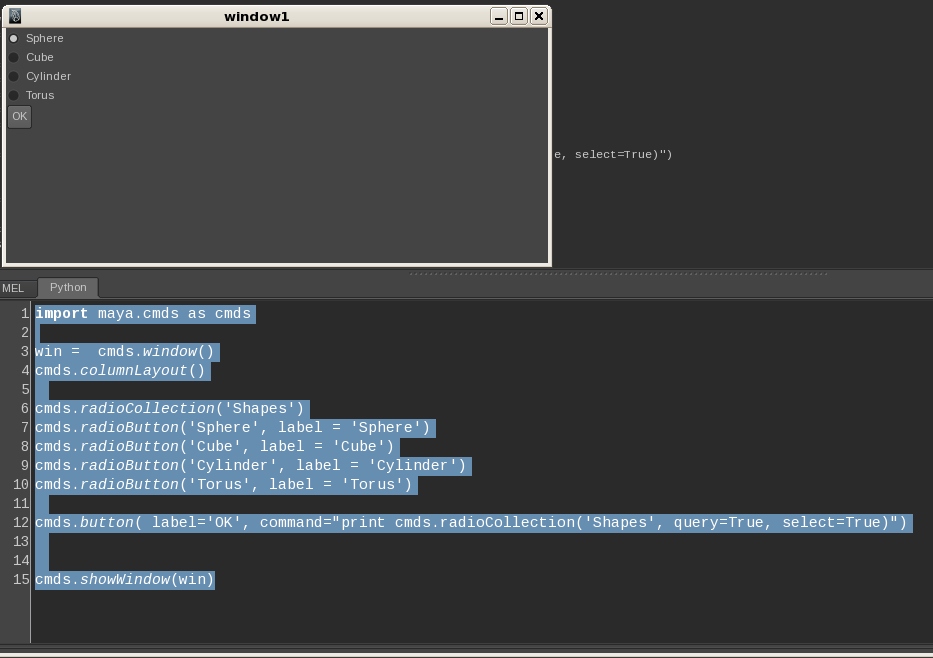
win =  cmds.window()
cmds.columnLayout()

cmds.radioCollection('Shapes')
cmds.radioButton('Sphere', label = 'Sphere')
cmds.radioButton('Cube', label = 'Cube')
cmds.radioButton('Cylinder', label = 'Cylinder')
cmds.radioButton('Torus', label = 'Torus')

cmds.button( label='OK', command="print cmds.radioCollection('Shapes', query=True, select=True)")

cmds.showWindow(win)
Note that you specify the command for the button, in a separate 'callback' function (that Maya will call back, (only) when the user clicks the button. Here's what the callback will look like:
# note - 'self' MUST always be the first argument in a callback func definition
def createUsersObj(self):
    us = cmds.radioCollection('Shapes', query=True, select=True)
    print us
    if us=='Sphere':
     cmds.sphere()
    elif us=='Cylinder':
     cmds.cylinder()
    elif us=='Torus':
     cmds.torus()
    else:
     cmds.cube()


win =  cmds.window()
cmds.columnLayout()

cmds.radioCollection('Shapes')
cmds.radioButton('Sphere', label = 'Sphere')
cmds.radioButton('Cube', label = 'Cube')
cmds.radioButton('Cylinder', label = 'Cylinder')
cmds.radioButton('Torus', label = 'Torus')

cmds.button( label='OK', command=createUsersObj)

cmds.showWindow(win)
Some things are way simpler in pymel
Because pymel is object-oriented, it 'comes' with useful functionality pre-built. In the example below, you can see that its 'mel' object contains a MEL-language call "natively".
values = ['one', 'three', 'two', 'three', 'four']
# call a MEL function, via 'eval'
maya.mel.eval( 'stringArrayRemoveDuplicates( {"'+'","'
.join(values)+'"})')

values = ['one', 'three', 'two', 'three', 'four']
# much simpler - pymel's 'mel' includes stringArrayRemoveDuplicates()
mel.stringArrayRemoveDuplicates(values)
Running MEL procs from within pymel
There are times when you have a well-debugged,efficient piece of MEL code you like, and want to 'somehow' run that from within Python. How?
# 1. define
mel.eval( '''global proc myScript( string $stringArg,
float $floatArray[] )
{ float $donuts = `ls -type camera`;}''')

# 2. use
mel.myScript('test',[0.1,0.7])
mel.myScript('test',[]) # MelConversionError is thrown
pymel helps you 'string together' calls
// in MEL:
sphere();
string $sel[] = `ls -sl`;
string $shapes[] = `listRelatives -s $sel[0]`;
string $conn[] = `listConnections -s 1 -d 0 $shapes[0]`;
setAttr ($conn[0] + ".radius") 3;

# Back in Py:
sphere()
selected()[0].getShape().inputs()[0].radius.set(12) # wow
pymel's nodes - RICH functionality
camTrans, camShape = camera()  # create a new camera

camShape.setFocalLength(100)
fov = camShape.getHorizontalFieldOfView()
print fov

camShape.dolly( -3 )
camShape.track(left=10)

dir(cam) # all of cam's methods/members
Another pymel example
Again, based on a node's type, we can call appropriate methods.
s = polySphere()[0] # just shape

dir(s)

if s.visibility.isKeyable() and not s.visibility.isLocked():
    s.visibility.set(False)
    s.visibility.lock()
    print s.visibility.type()

dir(s.getChildren()) # what are we seeing??


dir(s.getChildren()[0])
pymel - reach deep into nodes
You can also do component-level processing, using simple-looking calls:
s = polySphere()[0] # just shape

# s.faces is a list of all faces
for face in s.faces:
    if face.getNormal('world').y > 0.0:
       select(face, add=1)
Comparison: three eval()s
There is MEL's eval() command that is available via maya.cmds.eval() and also pymel's mel.eval(), as shown below. In addition, entirely separately, Python's native eval() call is also there(to evaluate a **Python** string).
# maya.cmds
maya.mel.eval("curve -d 3 -p 0 0 0 -p 1 0 0 -p 0 1 0 -p 0 0 1")

# pymel
mel.eval("curve -d 3 -p 0 0 0 -p 1 0 0 -p 0 1 0 -p 0 0 1")

# Python's built-in eval()
eval('camera()')
Manipulating the Maya 'optionVar' database - so simple
Maya stores ALL CUSTOMIZATIONS in a database (maintained in a MEL script).
if 'numbers' not in optionVar:
    optionVar['numbers'] = [1,24,47]
optionVar['numbers'].append(9)
numArray = optionVar.pop('numbers')
Comparable MEL commands are shown here.
Getting/setting globals
All globals are in a pymel dictionary called 'melGlobals':
melGlobals['$gMainFileMenu']
melGlobals['$gGridDisplayGridLinesDefault'] = 15
Some custom operators
pymel comes with operators for parenting nodes, and for connecting and disconnecting attrs.
# create a camera and a sphere
camXform, camShape = camera()
sphere = polySphere()[0]

sphere | camXform  # parent the camera to the sphere

camXform.tx >> camXform.ty  # connect operator

camXform.tx // camXform.ty  # disconnect operator