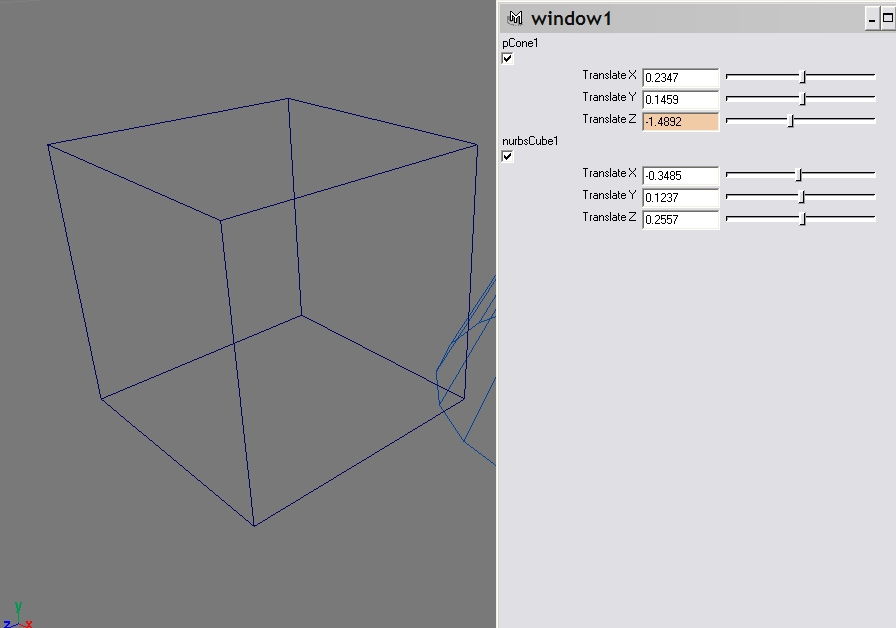
Usage: autoUI()
Useful commands:
- window
- scrollLayout
- columnLayout
- text
- checkBox
- attrFieldSliderGrp
- showWindow
Usage: showTimeCode()
Useful commands:
Usage: lod()
Useful commands:
Usage: autoUI()
Useful commands:
Usage: nurbsTorus(minorRadius, minorSections, majorRadius, majorSections).
Eg: nurbsTorus(0.5, 4, 0.5, 10);
Useful commands:
catch() is a very useful command. It catches errors 'thrown' by commands, turns the results into a 0 (success) or 1 (failure). Upon failure, you can choose to terminate your script (by issuing your own error()), or keep going (by issuing just a warning()). If you don't use catch(), you don't have that choice - Maya will automatically terminate your program when the offending command fails!
sphere; // no catch() needed, we know this will work

if(catch(`sphere`))
  error "WEIRD - the built-in sphere() command FAILED!"; // we'll never see this error since the result of our catch() will be a 0 [success]

// run both lines below together:
SPHERE; // will fail
cone; // so we'll never see this

// but with the catch() catching the error, we will see the cone:
if(catch(`SPHERE`))
  warning "It is 'sphere', not 'SPHERE'!"; // no need to terminate, so keep going
cone;
Usage: particlesOnVertices()
Useful commands:
This is from http://www.purplestatic.com/MEL:

Getting Maya to execute strings

Once you have a string that's combination of literals and variables adding up to a valib MEL expression, you'll need a way to have Maya actually run the code. There are a number of different ways to do that-
Pass the string to the eval command, causing Maya to run it immediately
Use the string as the command string for an interface element. This can take a number of different forms, from dropping it onto a button such that it executes when pressed, or tying it to a -dragCommand, -changeCommand, or similar
Dropping the string into an expression via expression -string $commandString
Dropping the string into a script job via the scriptJob command
Dropping the string into a script node vis the scriptNode command
Save the text to a new file, either a .MEL file for use in Maya, or even as a source file (using appropriate syntax) for a different language alltogether