

The Basic Data Views section showed us different default views of the database data. How were these views defined? What data was used to display this information? Step into the Admin office to learn more about the Queries and Templates used here.
For every data view we saw in the aforementioned section, there was an entry in the Queries table. This entry defines several key pieces of information used in the data display.
As show in the image above, we have queries that have names like Jobs_Current, Jobs_Error, Jobs_Recent or Slots_Active. The second half of the query name is used to define the query on the second row of the navigation bar.
phpscript - The phpscript field contains the name of the PHP
page which will be called to display the data when this query is run.
In most cases we use a single page called main.php, however, custom
pages can be written to extend the capabilities of the system.
header template
row template
footer template
The three templates above contain the name of HTML templates which are used
to format the data returned from the SQL query. Generally the header
template contains the main TABLE and table header definitions.
The row template is called for every row of data returned by the
query. The row template formats the returned data.
The footer template generally is the TABLE closing tags, as well as any additional
information you may want displayed.
In the standard main.php script these three templates are encapsulated
within calls to a standard_header and standard_footer template.
If you were to look at a typical page outline, it would look like this:
standard header template
header template
row template (multiple times)
footer template
standard footer template
SQL statement - This statement is the SQL select statement
used to retrieve data from the database.
Where clause - This is the default WHERE CLAUSE used with the
SQL select statement. Note, this clause will generally be modified by
clicking on specific links.
Order By statement - If defined, this is the default ORDER
BY clause sent with the SQL statement
Visibility - A string that contains information regarding where or
when the Query will be visible. Currently the system only understands
'navbar' or blank. If the visibility field contains 'navbar', then
this query will be visible in the navigation bar. If it doesn't, then
this query will not show up in the navigation bar.
Collect - This is the names of data fields that are to be
collected during running a query. These collected values are used in
our Alfred Control area, to pass information on to the controlling
pages.
Rank - The second row of the navigation bar is sorted first
by rank, in descending order, and then alphabetically. You can control
the ordering of the queries on the
navigation bar by changing the rank value. When the top row navigation tab
is clicked the highest ranked query in that section is executed as the
default query. By default, the BatCave is set up such that an empty
query is executed when the navigation tabs are clicked. This was set
this way to prevent executing a query that might take a long time to
execute, which wasn't really desired. Again, this default query can be
changed by making your query of choice the highest ranked in this section.
The three templates defined in each query are referenced in the Templates table. Each record in the Templates table consists of the following information:
templateID - A unique number, assigned by the database, to
indentify the template
templateName - A unique name for the template. Similar
to the Queries table, the templateName should follow the form of Section_Name.
The first part (section) is used to group templates into similar sections
for the editing page.
templateCode - This is the actual HTML code which will be emitted into the output. Because this is run through the PHP eval code, variable names like $record[hostname] will be expanded on the fly. This is how most of the data from the database is turned into HTML.
Let's take a closer look at one of the default views, the Current Jobs query. As a refresher, let's see what this might look like on the screen.
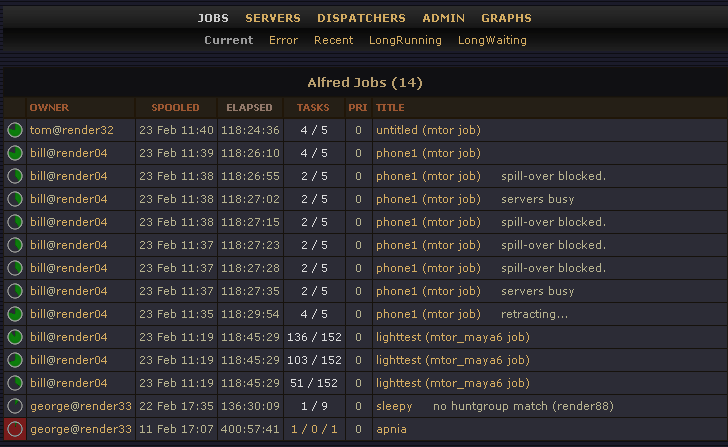
Now let's look in detail at the Jobs_Current query
| Field | Contents | Comments |
|---|---|---|
| queryid | 21 | Used internally. Generally not important to the user. |
| query | Jobs_Current | The query name, specified as Section_Name. |
| phpscript | main.php | This is the default page, main.php. |
| ldescript | "Display a summary of jobs that are currently running or have errors." | A long description of this query. |
| header_template | job_pxSummaryHeader | Contains the title and then a table definition with the column definitions of the rows to be displayed. |
| row_template | job_pxSummaryRow | Contains instructions for displaying every row of data |
| footer_template | job_pxSummaryFooter | Contains the table close tag (</table>). |
| sql | SELECT jid,user,host,port,djid, filename, title, priority, UNIX_TIMESTAMP(spooltime) AS spooltime, UNIX_TIMESTAMP(starttime) AS starttime, UNIX_TIMESTAMP(statetime) AS statetime, UNIX_TIMESTAMP(donetime) AS donetime, UNIX_TIMESTAMP(deletetime) AS deletetime, numTasks, error, done, dispatchnotes FROM Job |
|
| whereclause | WHERE numTasks AND (NOT deletetime) AND (NOT donetime) | |
| orderby | ORDER BY spooltime DESC | |
| visibility | navbar | This query is visible on the navigation bar. |
| collect | jid,user,host,port,priority,title | Used for job control. |
| rank | 10 | |
OK, now let's have a look at the templates referred to in this query
| Field |
Contents |
Comments |
|---|---|---|
| templateID | 65 | Not generally useful to user. Used in editing pages. |
| templateName | job_pxSummaryHeader | Template name in Section_Name format |
| templateCode | <!-- Table Title --> <div align="center"> <table class="titletable"> <tr > <td width="100%"><h5 align="center">Alfred Jobs ($numrows)</h5></td> </tr> </table> <!-- Table Data--> <table class="basictable" > <tr> <th> </th> <th align="left"><% sortURL($orderby,"user",$dir,"OWNER") %></th> <th><% sortURL($orderby,"spooltime",$dir,"SPOOLED") %></th> <th>ELAPSED</th> <th align="center"><% sortURL($orderby,"numTasks",$dir,"TASKS") %></th> <th><% sortURL($orderby,"priority",$dir,"PRI") %></th> <th align="left"><% sortURL($orderby,"title",$dir,"TITLE") %></th> </tr> |
|
| Field |
Contents |
Comments |
|---|---|---|
| templateID | 66 | Not generally useful to user. Used in editing pages. |
| templateName | job_pxSummaryRow | Template name in Section_Name format |
| templateCode | <tr> <% pxPercentPieColumn($record[jid], $record[numTasks], $record[done], $record[error], $record[donetime], $record[deletetime]) %> <td align="left"><% dispatcherJobLink($record[user],$record[host],$record[port])%></td> <td align="center" class="nobreak"><% date('j M H:i',$record[spooltime]) %></td> <td align="center"><% pxElapsedTime($record[spooltime],$record[donetime], $record[deletetime])%></td> <td align="center"><% pxTaskCounts($record[jid],$record[numTasks],$record[done],$record[error]) %> </td> <td align="center">$record[priority]</td> <td align="left" width="60%"><a href="<% pxJobDetailLink($record[jid]) %>">$record[title]</a> $record[dispatchnotes]</td> </tr> |
|
| Field |
Contents |
Comments |
|---|---|---|
| templateID | 64 | Not generally useful to user. Used in editing pages. |
| templateName | job_pxSummaryFooter | Template name in Section_Name format |
| templateCode | </table> </div> $expert_view |
|
The majority of the work in the SQL query is performed by the row
template. The row template has the responsibility of formatting each row
of data. Generally a row template is table-record tags <tr></tr>,
with some number of table-descriptor tags, one for each colum of data.
Let's look at the row template:
<tr>
</tr>
The whole template is enclosed within the table record tags. Now, lets look at one of the columns. First lets start with one of the simple columns, the priority field:
<td align="center">$record[priority]</td>
When the inner loop on main.php operates it collects each row into an array variable called $record. Each field that was selected the the SQL statement will be available as a value within that array. The priority data is retrieved here with the $record[priority] syntax. So, this whole entry here puts the priority value, as returned directly from the database, into one column in the returned table.
Now, let's look at one of the more complicated columns.
<td align="center" class="nobreak"><% date('j M H:i',$record[spooltime]) %></td>
This is an example of calling a PHP function, directly from the template. The tags <% %> are used to specify a PHP function, which will be used to format the data. In this particular example the array $record[spooltime] contains a timestamp of when the job was spooled. The date() function in PHP is used to format a date, using a format string to define how the date will display.
Let's look at one more column, which uses a custom function rather than a default PHP function:
<td align="left"><% dispatcherJobLink($record[user],$record[host],$record[port])%></td>
The dispatcherJobLink() function is part of the PHP code in the BatCave. The function resides in batcave/funcs/utilityfuncs.php. The function takes as its input the user name, the dispatcher host, and the port from the Job table. The function creates special links that link off to the dispatcher, or back to the main query, but limit the row data to the specified user.
|
Pixar Animation Studios
|